
EID Match for eSIM Activation: Everything You Need to Know
Imagine trying to open a locked door without the right key. Frustrating, right? When it comes to activating an eSIM, your EID is that crucial key. It's the unsung hero working behind the scenes to get you connected. If you've ever found yourself scratching your head during an eSIM setup, chances are the EID, or Embedded Identification Document, played a starring role in the process. This guide will demystify the EID, show you how to find it, explain why it's so vital for your eSIM, and help you troubleshoot common issues.
What Exactly is an EID? Your eSIM's Unique Identifier
Think of your EID as the digital fingerprint of your phone's built-in SIM card. Just as your fingerprint is unique to you, your device's EID is unique to its eSIM chip. It's a long string of numbers, and while it might look like a random jumble, it holds the key to your device's ability to connect to a cellular network without a physical SIM card.
Breaking Down the EID: What It Is and What It Isn't
The EID, or Embedded Identification Document, is a unique serial number specifically assigned to the eSIM module embedded within your device. Unlike a physical SIM card, which has an ICCID (Integrated Circuit Card IDentifier) printed on it, the EID is purely digital and lives within your device's software and hardware.
It's important to understand what the EID isn't. It's not your phone number, nor is it directly tied to your personal identity in the same way a driver's license or passport number is. Instead, it's a hardware identifier, much like the IMEI (International Mobile Equipment Identity) of your phone itself. The EID specifically identifies the eSIM chip, allowing carriers to differentiate it from all other eSIM chips in the world. It’s what enables the remote provisioning of your cellular plan to your device.
Why the EID Matters for Your eSIM Journey
The EID is the linchpin of eSIM technology. Without it, your device wouldn't be able to communicate with your mobile carrier's network to download and activate a cellular plan. When you decide to use an eSIM, your carrier needs to know which specific eSIM chip in which specific device it should send the profile to. The EID provides that precise address.
Consider it like this: you order a package online. The company needs your exact mailing address to deliver it. In the world of eSIMs, your EID is the precise "mailing address" for your digital SIM profile. If you provide the wrong EID, or if your device's EID isn't correctly recognized, your carrier won't know where to send your plan, and you'll be stuck without service. This unique identifier ensures that your mobile plan is securely and accurately installed onto your device's eSIM, and no one else's.
The EID's Role in eSIM Activation: A Seamless Connection
The beauty of eSIMs lies in their ability to provision cellular service over the air, eliminating the need for physical cards. But this "over-the-air" magic relies heavily on the EID to create that seamless bridge between your device and your chosen mobile network.
How Your EID Links to Your Mobile Plan
When you sign up for an eSIM plan with a carrier, they need to associate your new service with a specific eSIM chip. This is where your EID comes into play. You’ll typically provide your EID to the carrier during the sign-up or activation process. The carrier then uses this EID to create a unique digital profile, which contains all the necessary information for your phone to connect to their network—your phone number, data allowances, billing details, and so on.
Once this profile is ready, it’s digitally "pushed" to your device using the EID as the target address. Think of it like a personalized message sent directly to your phone's eSIM. The EID acts as the recipient's identifier, ensuring the right message (your mobile plan) goes to the right inbox (your device's eSIM). Without this EID, the carrier wouldn’t know where to send your plan, making it impossible to establish service.
The Activation Process: Where the EID Comes In
The actual eSIM activation process usually involves a few steps, and the EID is central to the handshake between your device and the carrier.
-
Initiation: You typically start by purchasing an eSIM plan or requesting an eSIM activation from your carrier.
-
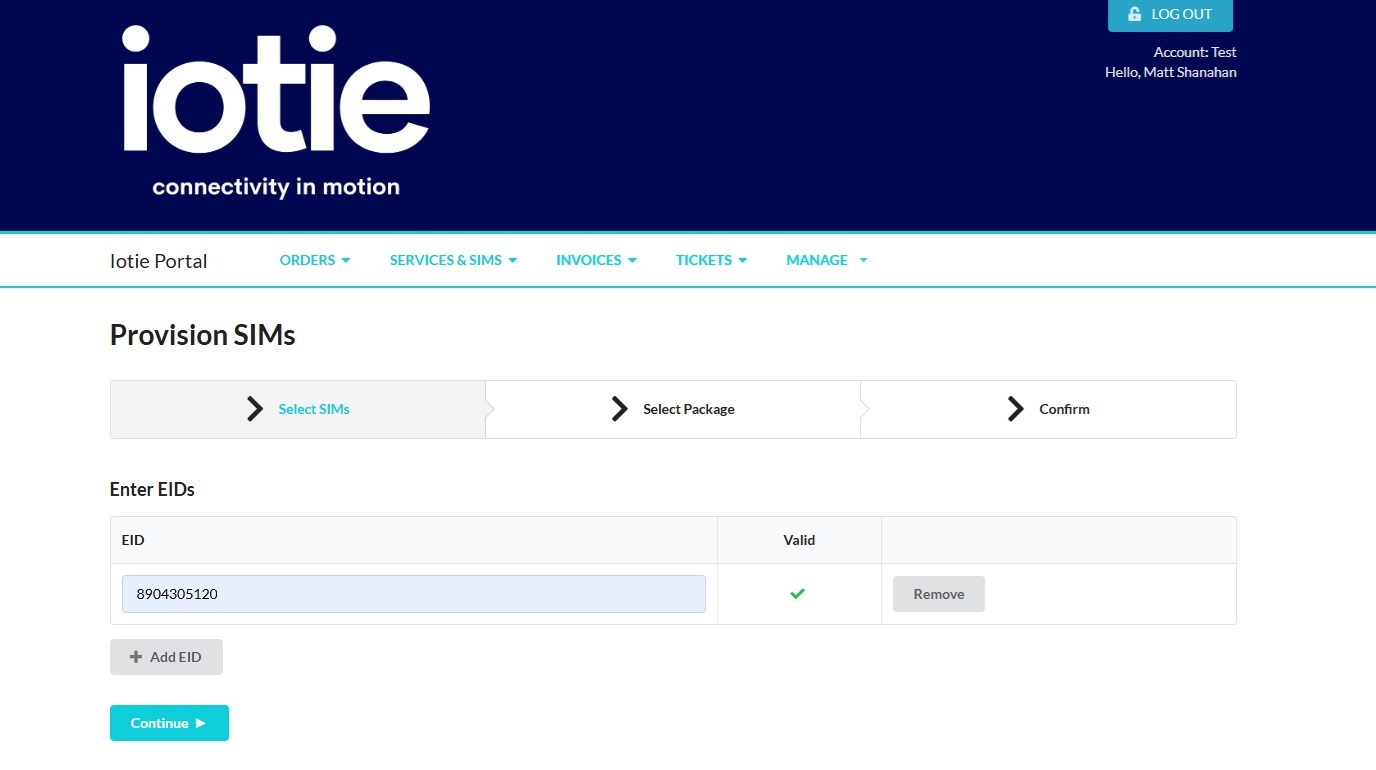
EID Submission: The carrier will almost always ask for your device's EID. You might enter it manually on their website, share it with a customer service representative, or in some cases, your device might send it automatically if you're activating directly through its settings.
-
Profile Generation: The carrier uses your EID to generate a unique eSIM profile tailored to your device and plan.
-
Download and Installation: Your device then initiates a request to download this profile. The EID again plays a role in authenticating this request, ensuring it's coming from the correct device.
-
Activation: Once downloaded, the profile is installed onto your eSIM. Your device then registers with the network, and voilà! You're connected.
If there's a mismatch or an error with the EID at any stage, the activation will fail. It’s like trying to download a file from a server that doesn't recognize your credentials; the connection simply won't be made. Therefore, accurately providing and confirming your EID is perhaps the most critical step in a smooth eSIM activation.
Finding Your EID: Where Does It Live?
Your EID isn't something you'll find printed on a sticker or easily visible on the outside of your device. Since it's tied to the embedded eSIM chip, it lives within your device's software settings. The exact steps can vary slightly depending on whether you're an iPhone or Android user, but the core idea remains the same: navigate to your device's cellular or "About" settings.
For iPhone Users: A Few Taps Away
Apple has made finding your EID straightforward on iPhones that support eSIM (iPhone XS, XS Max, XR, and newer).
-
Open Settings: Tap the grey gear icon on your home screen.
-
Navigate to General: Scroll down and tap on "General."
-
Access About: Tap on "About." This section contains all sorts of information about your device.
-
Locate the EID: Scroll down in the "About" section. You'll see various identifiers like IMEI, ICCID (if you have a physical SIM), and toward the bottom, you should find "EID." It's a long string of numbers.
-
Copy the EID: You can often long-press the EID number to copy it, which is incredibly useful for pasting it into a carrier's website or an email, reducing the chance of typos.
Remember, if you've already added an eSIM profile, you might see the EID listed under "Cellular" or "Mobile Data" settings as well, often when viewing details of a specific cellular plan. But the "About" section is the most reliable place to find it universally.
For Android Enthusiasts: Navigating Your Device Settings
Android devices, due to the variety of manufacturers and custom interfaces, might have slightly different pathways to the EID. However, the general location is typically within the phone's "About phone" or "Network & internet" settings.
Here’s a common path, though it might vary for your specific device (e.g., Samsung, Google Pixel, OnePlus):
-
Open Settings: Look for the gear icon, usually in your app drawer or by swiping down from the top of your screen and tapping the gear.
-
Find "About phone" or "About device": This is often under the main "Settings" menu or sometimes within a "System" sub-menu.
-
Look for "SIM status" or "eSIM status": Once in "About phone," you might need to tap on "SIM status" or "eSIM status" or "Network" to reveal more details.
-
Locate the EID: Scroll through the information provided. The EID will be listed there, similar to how it appears on iPhones. It's usually a long numerical string.
If you can't find it directly under "About phone," try searching for "EID" within your device's main Settings search bar. This can often pinpoint its exact location quickly
When All Else Fails: Your Carrier's Lifeline
If you've scoured your device settings and still can't locate your EID, don't panic. Your mobile carrier or the device manufacturer often has tools or support personnel who can help.
- Using your phones dial pad: Using your phones dial pad dial *#06# and your phone will display your EID and IMEI numbers
- Carrier Support: If you're trying to activate an eSIM, your carrier's customer service can often guide you step-by-step to find the EID on your specific device model. They deal with these questions daily.
- Device Manufacturer Support: Companies like Apple, Samsung, or Google have extensive support websites or chat services. Providing them with your device model can often lead to precise instructions or even remote assistance to find the EID.
- Retail Store: If you purchased your device from a physical store or your carrier has a brick-and-mortar presence, visiting them can be an option. They might be able to find the EID for you or even assist with the activation process directly.
Remember, the EID is fundamental for eSIM activation, so carriers are usually well-equipped to help you locate it if you encounter difficulties.
Common EID-Related Issues and Troubleshooting Tips
While the EID is designed to streamline activation, sometimes things go awry. Understanding common EID-related issues can save you a lot of headache and help you troubleshoot effectively.
"EID Not Found": What to Do When It Disappears
If you're trying to find your EID and your device reports "EID Not Found," or you simply can't locate it where it's supposed to be, there are a few possibilities:
-
Device Compatibility: The most common reason is that your device simply doesn't have an eSIM chip. Older phones or some models sold in specific regions (e.g., certain models in China) might not support eSIM technology. Double-check your device's specifications to confirm eSIM compatibility.
-
Software Glitch: Occasionally, a temporary software bug can hide the EID. Try restarting your device. A simple reboot can often resolve minor software hiccups.
-
Pending Updates: Ensure your device's operating system is up to date. Manufacturers often release updates that improve eSIM functionality or fix display issues.
-
Hardware Issue: In rare cases, if your device is eSIM-compatible but the EID is genuinely missing after troubleshooting, it could indicate a hardware fault with the eSIM chip. This would require professional repair or replacement.
Before assuming the worst, always confirm compatibility and perform a restart.
Activation Glitches: Is Your EID the Culprit?
You've got your EID, you've submitted it to your carrier, but the eSIM isn't activating. This is a common scenario, and the EID can indeed be the root cause:
-
Typo in EID: This is surprisingly common. EIDs are long strings of numbers. A single mistyped digit can prevent activation. Double-check the EID you provided to your carrier against what's on your device, letter by letter. Copy-pasting is always preferable.
-
Carrier System Error: Sometimes, the issue isn't with your EID but with the carrier's system. They might have incorrectly entered your EID, or there could be a delay in their provisioning system. Contact their support to verify the EID they have on file and confirm if there are any known system issues.
-
Device Blacklisting/Locking: Less common, but if your device is blacklisted or network-locked to a different carrier, it might prevent a new eSIM profile from activating, even if the EID is correct. Ensure your device is unlocked for the carrier you're trying to activate with.
-
Multiple eSIMs/Profiles: If you've previously used eSIMs, ensure you're trying to activate a new profile or managing existing ones correctly. Sometimes, having too many inactive profiles can cause confusion.
When activation fails, start by verifying the EID meticulously. If it's correct, reach out to your carrier with your EID in hand, as they have the best tools to diagnose issues on their end.
What Happens if Your EID Changes?
Fortunately, your EID does not change. The EID is a unique identifier permanently embedded in your device's eSIM hardware during manufacturing. It's like your car's VIN (Vehicle Identification Number)—it stays with the car for its entire life.
Therefore, you don't need to worry about your EID suddenly being different or needing to be updated. If you get a new phone, that new phone will have its own unique EID. If you factory reset your current phone, the EID will remain the same. The EID is a hardware-level identifier, not a software setting that can be altered or reset by the user. This immutability is crucial for the security and reliability of eSIM provisioning.
EID Security and Privacy: What You Need to Know
In an increasingly connected world, concerns about security and privacy are paramount. It's natural to wonder about the implications of having a unique identifier like an EID tied to your device.
Protecting Your EID: Why It's Important
While the EID isn't as sensitive as your social security number or credit card details, it's still a unique identifier for your device's eSIM chip. Think of it as a device-level credential. Here's why you should protect it:
-
Preventing Unauthorized Provisioning: If someone were to obtain your EID and pair it with personal information, they might theoretically attempt to activate a cellular plan on a device claiming to be yours. While carriers have robust authentication processes in place (e.g., requiring account logins, OTPs), keeping your EID private adds an extra layer of security.
-
Device Tracking (Limited): Like other device identifiers (IMEI), in the wrong hands, a sophisticated entity could potentially use an EID to identify a specific device. However, without access to carrier records, connecting an EID to an individual's identity is extremely difficult for a third party.
In practice, the most common scenario where you'll share your EID is with your trusted mobile carrier during activation. Avoid sharing it on public forums or with unknown individuals, just as you would with your device's IMEI.
Is Your EID Linked to Personal Data?
The EID itself is a hardware identifier; it contains no personal data about you. It's just a number. However, when you provide your EID to a mobile carrier, that carrier then links your personal account information (name, address, billing details, phone number) to that specific EID in their internal systems.
This linking is essential for the service to function. It allows the carrier to provision your plan, bill you correctly, and manage your service. For example, if you call customer support about an issue, they might ask for your phone number, which they then use to look up your EID and the associated eSIM profile in their database.
So, while the EID itself is anonymous, the carrier's database creates the connection between your EID and your personal data. This is why carriers have strict privacy policies and data protection measures in place to safeguard this linked information. Your privacy is therefore protected by the carrier's commitment to data security and regulations governing personal information.
.
The Future of EIDs and eSIM Technology
The EID is more than just a current necessity; it's a foundational element for the evolving landscape of cellular connectivity. As eSIM technology becomes more prevalent, the role of the EID will only solidify and integrate further.
.
How EIDs Are Evolving with eSIM Innovations
The EID, as a static identifier, isn't necessarily "evolving" in its structure, but its integration and utilization are becoming more sophisticated.
-
Remote Provisioning Standards: EIDs are central to the GSMA (Global System for Mobile Communications Association) standards for remote eSIM provisioning. As these standards mature, EIDs will enable even more streamlined and automated processes for activating devices, from smartphones to IoT sensors.
-
Multi-eSIM Devices: We're already seeing devices that can hold multiple eSIM profiles. The EID remains the single identifier for the embedded hardware, but the software layers managing these profiles are becoming more intelligent, using the EID as the anchor for all these different connections.
-
Enhanced Security Protocols: Future innovations may see EIDs integrated into even more robust security protocols for network authentication, further hardening the connection between your device and the cellular network against potential threats.
-
Broader Device Adoption: As eSIMs move beyond phones into tablets, smartwatches, laptops, and even vehicles, the EID will be the ubiquitous identifier enabling cellular connectivity across a vast array of interconnected devices.
The EID's unchanging nature is actually a strength, providing a stable, reliable anchor point as the surrounding eSIM ecosystem rapidly advances.
.
The Broader Impact of eSIMs on Connectivity
The implications of widespread eSIM adoption, with the EID at its core, are transformative:
-
Global Seamless Roaming: Imagine traveling internationally without ever swapping a physical SIM or paying exorbitant roaming fees. eSIMs, facilitated by the EID, allow you to switch to local carriers digitally, making global connectivity as easy as selecting a new Wi-Fi network.
-
Enhanced IoT (Internet of Things): Billions of devices, from smart meters to agricultural sensors, need connectivity. Physical SIMs are impractical for many of these. eSIMs, identified by their EIDs, enable scalable and manageable cellular connectivity for the vast IoT ecosystem, unlocking new levels of automation and data collection.
-
Device Flexibility and Design: Without the need for a physical SIM tray, device manufacturers have more flexibility in design, allowing for more compact devices, improved water resistance, and potentially more space for other components or larger batteries.
-
Reduced Environmental Impact: Eliminating billions of plastic SIM cards and their packaging contributes to a reduction in electronic waste, making connectivity more sustainable.
-
Simplified Carrier Switching: The power shifts more to the consumer. Switching carriers becomes a matter of software, not hardware, potentially leading to increased competition and better deals for users.
In essence, the EID is a small but mighty component that underpins a future where connectivity is more fluid, accessible, and integrated into every aspect of our digital lives. Understanding it is a step towards fully harnessing the power of the eSIM revolution.
.
Get in contact
Looking to start your eSIM journey? Get in contact with IoTie to see how we can transform your mobile journey.